
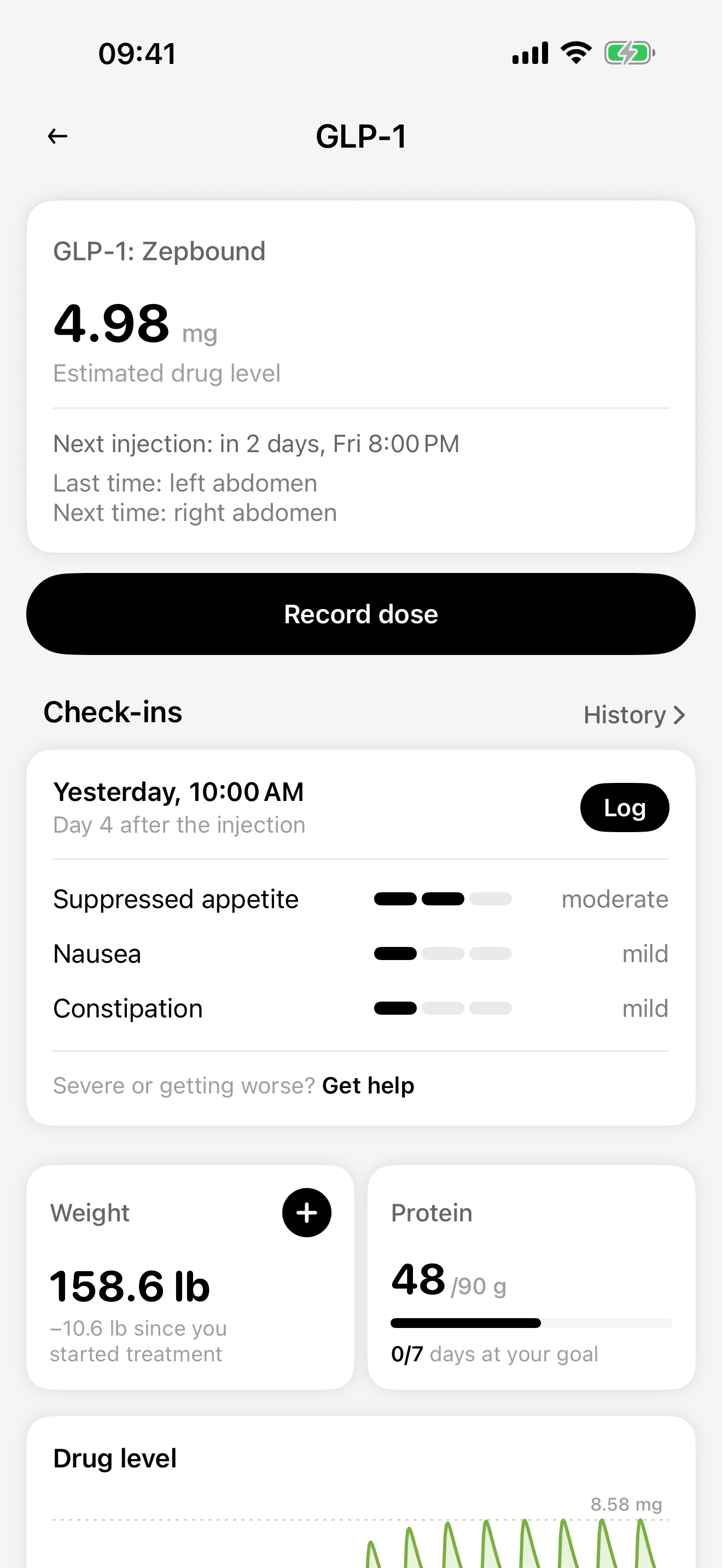
A GLP-1 tracker is a place to keep your medication records, reminders, and notes. CalZen brings those records alongside your food diary and weight. It records the plan you were prescribed; it does not decide your treatment.
The details you want to remember
Your last shot
Record the medication, amount, and actual date and time. Add an injection site if you want to find that detail in your history.
Your next reminder
Enter the schedule your prescriber gave you and choose a reminder. A notification is a prompt, not confirmation that a dose was taken.
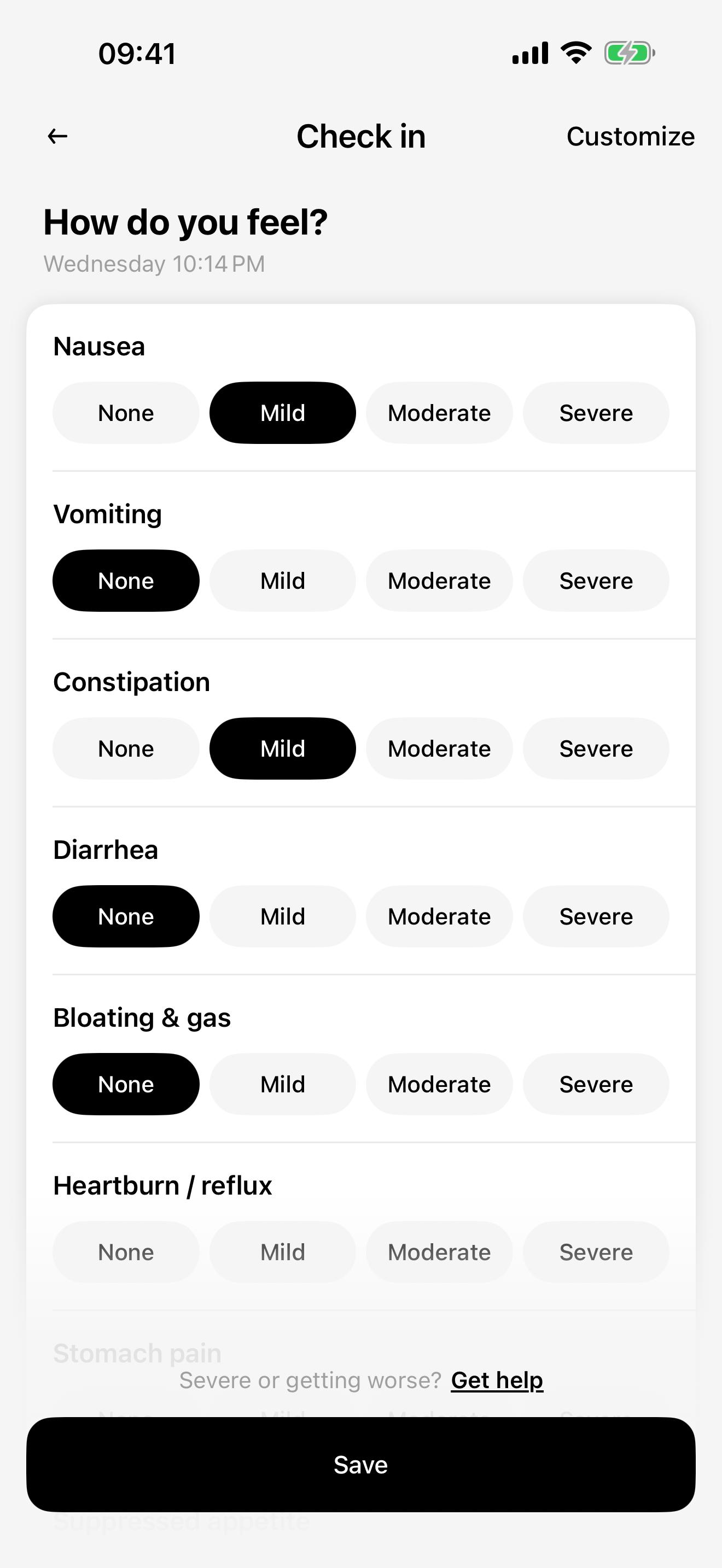
How you felt
Record appetite, nausea, fatigue, or other available check-in items. Notes describe your experience; they do not identify what caused it.
Food and weight, too
Keep meals, protein, and weight in the same app. Use the goals agreed with your healthcare professional rather than treating an app target as a prescription.
A record for the days between appointments
“Was that before or after my last injection?” is easier to answer with a dated record. You can check what you entered and write down questions for your next appointment.
You do not need to fill in every field. Start with the actual medication record, then add the details you personally want to remember. A blank day means there is no entry, not that you felt fine.
CalZen iPhone app screens with demo data. The medication, dose, measurements, and results shown are examples, not recommendations or expected results. The interface may vary by version.
Find the name on your prescription
The US catalog includes these names. Choose the exact product and form you were prescribed; matching an ingredient does not make two products interchangeable.
- Injectable medication records
- Zepbound, Mounjaro, Wegovy, Ozempic, Saxenda, Victoza, Trulicity
- Tablet records
- Rybelsus, Ozempic tablets, Wegovy tablets, Foundayo
A name in the tracking catalog is not a recommendation, an indication for weight loss, or proof of availability in your country. Products, presentations, and approved uses differ by market. Check your own medication information with your prescriber or pharmacist.
Start with the plan you already have
Choose the exact medication
Check the name and form against your prescription and packaging.
Record your prescribed plan
Enter your existing dose and schedule. Set a reminder if you would like one.
Log what actually happened
Save the actual date and time, then add a check-in or meal when useful. Review your records before your next appointment.
What a tracker cannot tell you
A calculated medication-level chart is an estimate based on records and a model. It is not a blood test, an individual response measurement, or a reason to change a dose.
If you missed a dose, are unsure whether you took one, or are concerned about symptoms, ask your prescriber or pharmacist. Do not use an empty entry, reminder, or chart to decide whether to take another dose.
Before you start
Can I use a paper log instead?
Yes. The printable log below works without an app, account, or email address. CalZen is an option if you want your records with reminders and your food diary.
Does CalZen choose or adjust my dose?
No. You enter the plan given to you by your prescriber. Medication choice, dosing, and treatment changes belong with your healthcare professional.
Is the whole tracker free?
This page does not promise free access to every app feature. Check the current app version and any purchase screen for included features and pricing. The website log template is free.
Where can I read about my data?
Read the Privacy Policy for medication records, health integrations, analytics, storage, and deletion. Only enable the permissions and optional features you want to use. Privacy Policy →
Keep the details together.
Try CalZen for your medication records, food diary, and weight. Prefer paper? The log template is ready to use.


Available for iPhone and Android. Features and purchase options may vary by app version and region. Check the app for current access and pricing.
All GLP-1 guides
- A Zepbound tracker for shots, weight, and meals
Keep your Zepbound shot history alongside weight, food and symptom notes. A practical recording checklist and printable log, with CalZen for iPhone and Android.
- Mounjaro records you can check later
Keep a clear Mounjaro injection log: actual dates, prescribed amounts, sites and notes. See how to move paper records into a tracker without losing detail.
- Wegovy tracking starts with the right form
Keep Wegovy records clear: distinguish injections from tablets, enter your prescribed plan, and review dated food and wellbeing notes in CalZen.
- An Ozempic log with the details kept intact
Record your exact Ozempic product, actual dates and prescribed amounts, with optional food and symptom notes. Includes a practical medication-log checklist.
- A GLP-1 food diary that records what you actually eat
A practical GLP-1 food diary: record actual portions, check protein estimates and keep questions for your care team. Includes a simple meal-entry example.
- A GLP-1 symptom log with dates and context
Keep a dated GLP-1 wellbeing record: what you noticed, when it started, duration and questions. Download a blank symptom-log CSV without signing up.
- How to track protein while using a GLP-1
Check protein per serving against the amount you actually ate. Worked label examples, a blank CSV log and a way to review estimates in CalZen.
- GLP-1 injection reminders: check the plan and the record
Set up reminders for your prescribed plan, check phone notification permissions and distinguish a scheduled shot from a completed entry in your history.
- Prepare your GLP-1 records for a doctor visit
Bring a clear question list, actual medication dates and useful food or wellbeing notes. Includes a blank one-page appointment sheet and a CSV worksheet.